The problem
I run IT for an RF semiconductor manufacturer: about 100 Windows laptops and desktops managed in Intune, and a small help desk. I wanted Claude to do real work on that fleet: find a laptop, explain a failed deployment, write the ticket notes. The shortcut is to give the model a shell and an admin account. I would not do that. A model with a raw shell and a standing password can wipe a machine because a prompt was ambiguous.
What I built
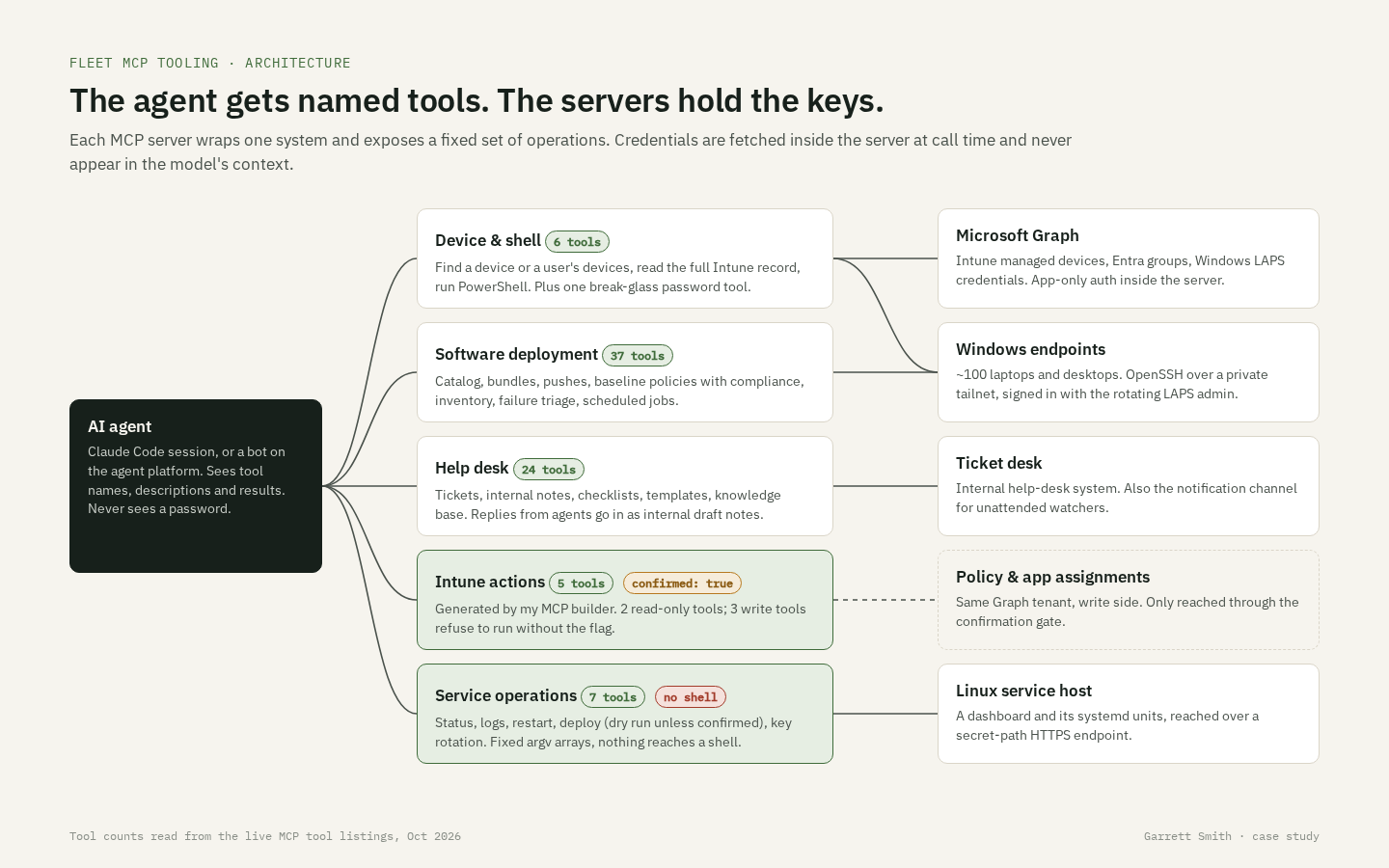
MCP servers that turn IT operations into named, scoped tools, plus the rules that make them safe.
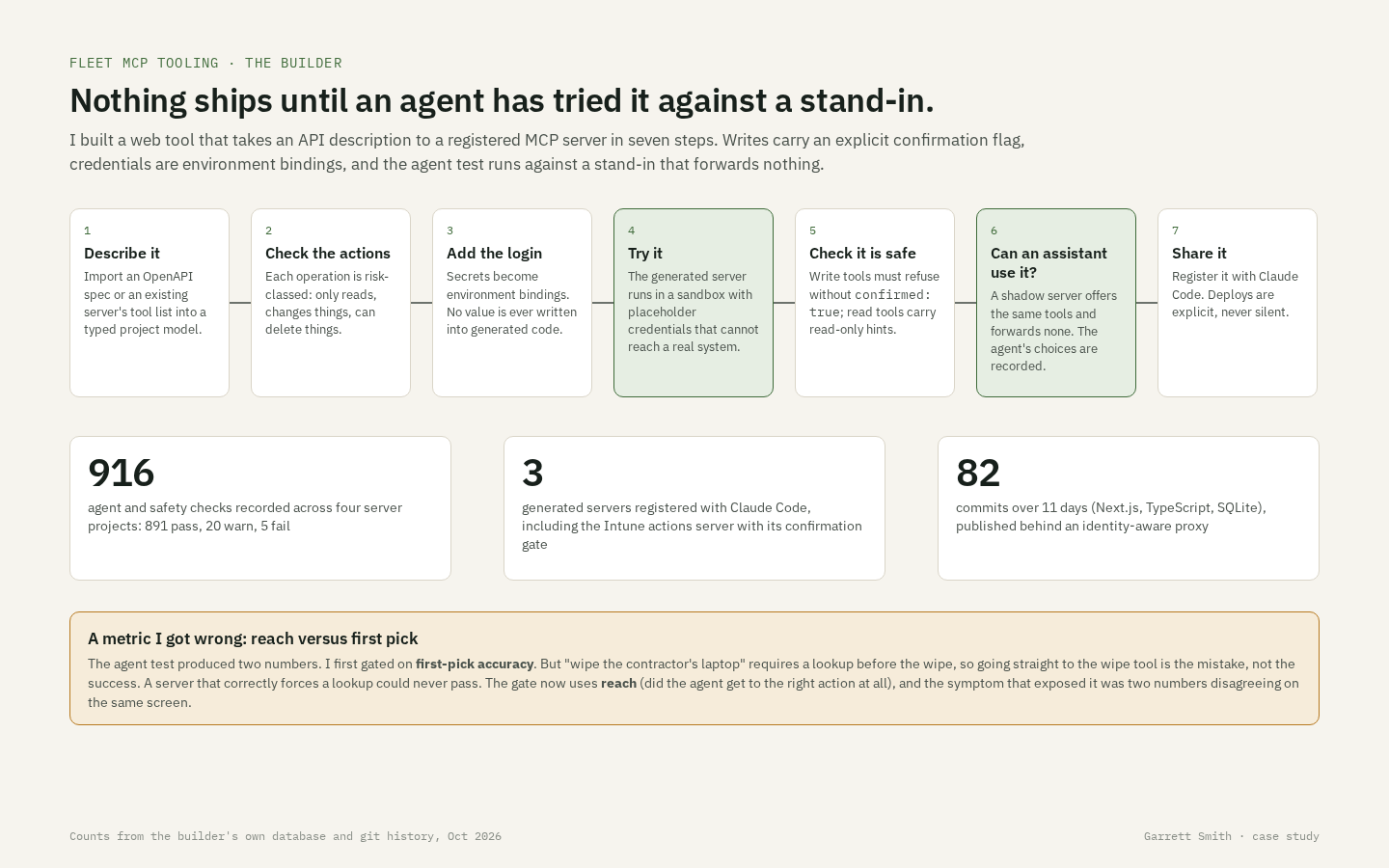
- An MCP builder (Next.js, TypeScript, SQLite). It takes an API description to a registered server in seven steps. Every operation gets a risk class, secrets become environment bindings, and write tools refuse to run without
confirmed: true. Before a server ships, an agent is tested against a shadow server that offers the same tools and forwards nothing. - An Intune actions server, generated by that builder: 2 read-only tools and 3 write tools. Wipe and retire are marked destructive.
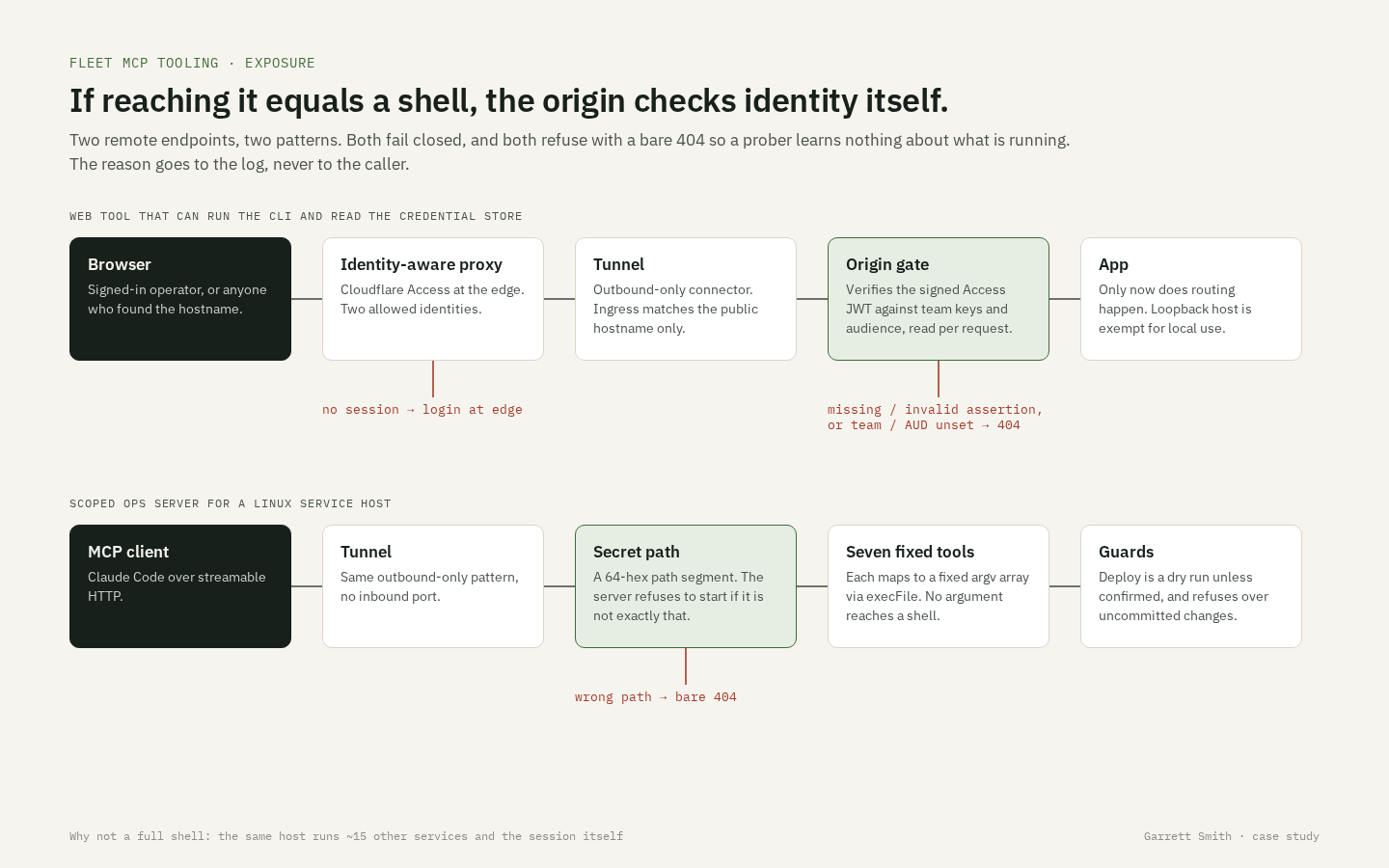
- A scoped ops server for a Linux service host: seven fixed tools, no shell. Each maps to a fixed argument array, so no input can become a command. Deploy is a dry run unless confirmed.
- Extensions and rules for the team's device server, which a teammate started. I added the device-record tool and wrote the usage rules.
- Other MCP servers I've written outside the fleet work: a Power Automate Desktop server (11 tools) that lets an agent write, validate and run desktop flows; a memory server (7 tools) for searching and recording facts in an encrypted ledger; and a project-scoped server that exposes a civic-data app's database, API budget and service scripts to its maintainer agent.
How it works
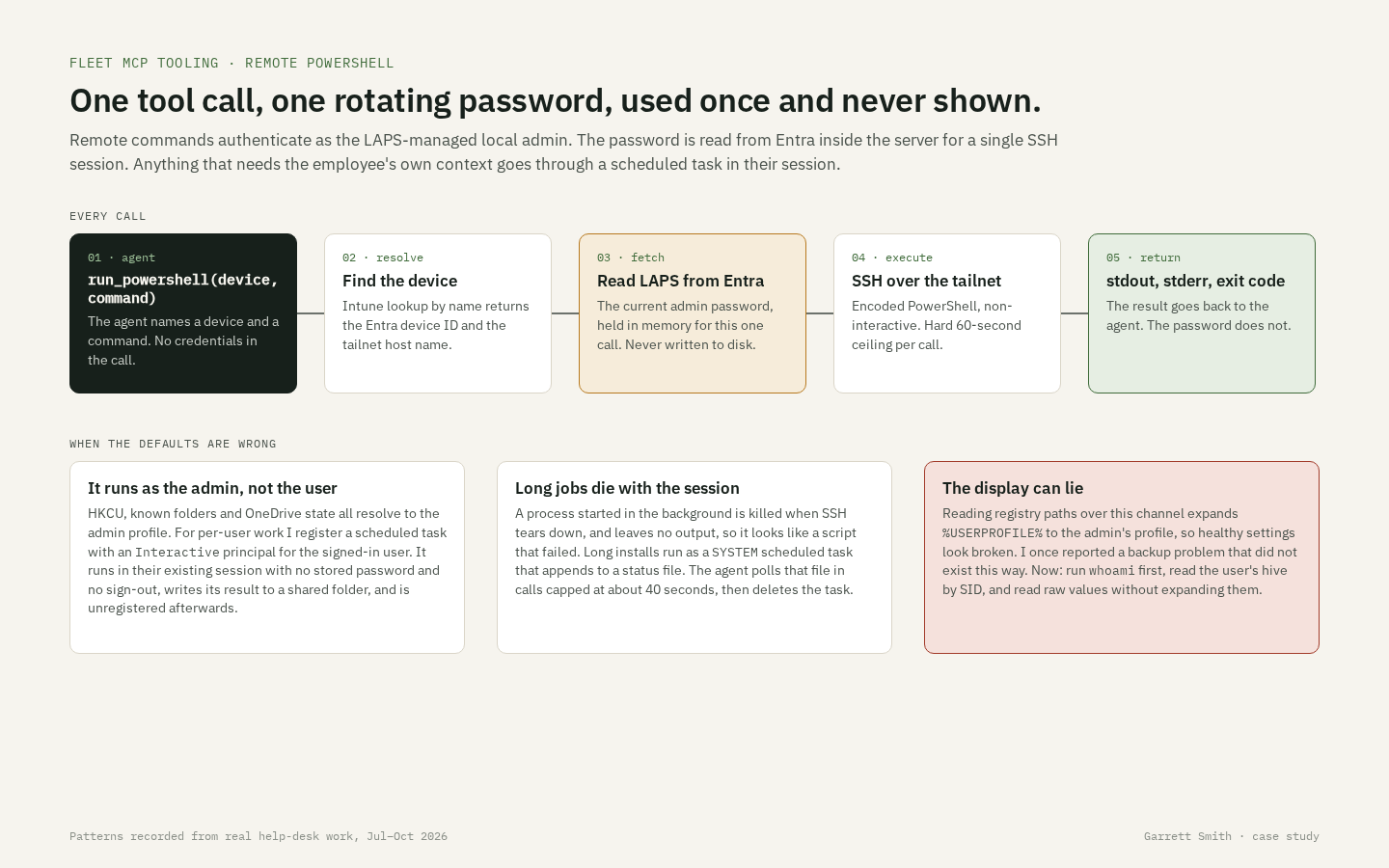
A remote command reads the device's current LAPS password from Entra, uses it for one SSH session, and returns only the output.
The defaults are wrong in specific ways:
- It runs as the admin, not the user. Per-user checks run as a scheduled task with an Interactive principal in the user's own session: no stored password, no sign-out.
- Long jobs die with the SSH session, silently. They run as SYSTEM scheduled tasks with a status file the agent polls.
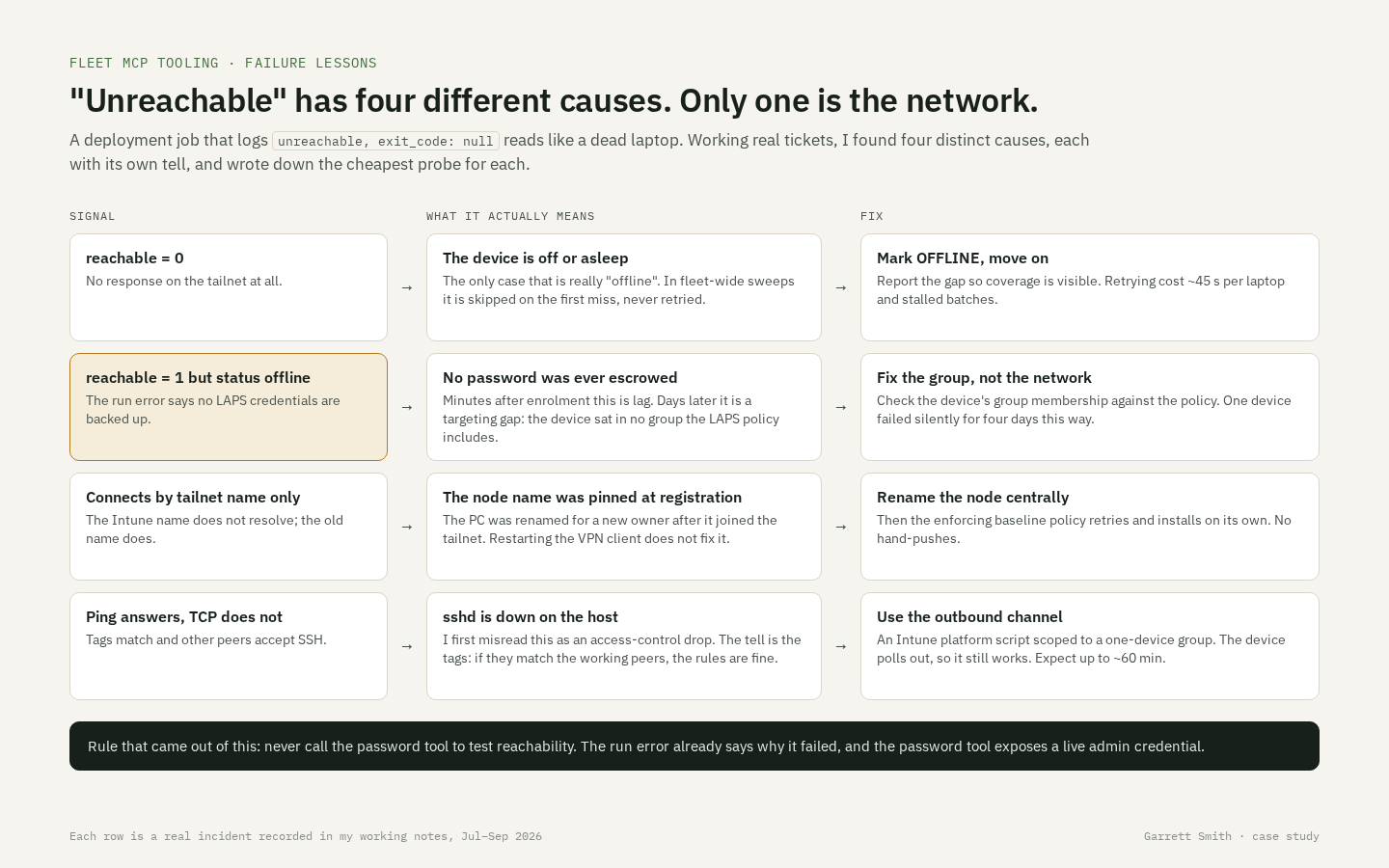
- "Unreachable" has four causes: device off, no LAPS password escrowed (a group-targeting gap), a tailnet node still carrying an old name, or sshd down. Each has its own tell.
- Intune reporting misleads. Per-device state reports each setting twice and rolls up to the worse copy, and a failed script can show
success. I confirm on the device before calling anything a failure.
Security and control
- Credentials stay inside the servers. The password tool is break-glass only and is never used to test reachability.
- Writes need explicit confirmation. Agent replies on tickets are internal draft notes.
- The builder can run the Claude CLI and read the credential store, so reaching it equals a shell. It sits behind Cloudflare Access, and the origin verifies the Access JWT itself. Refusal is a bare 404.
- The ops server answers only on a 64-hex secret path and refuses to start without one.
- The sharp edge: remote PowerShell is a real admin shell on the endpoint. That is why it carries the most rules.
Results
- 105 Intune-managed Windows devices reachable through these tools (live count, October 2026).
- Tools in use: 6 for device lookup and shell, 37 for software deployment, 24 for the help desk, 5 for Intune actions, 7 for service operations.
- The builder recorded 916 agent and safety checks across four server projects: 891 pass, 20 warn, 5 fail.
- Builder: 82 commits over 11 days; 3 generated servers registered with Claude Code.
- In all, I've built or generated at least seven MCP servers that run day to day, in Python and TypeScript.
- Four "unreachable" causes documented, each with a probe that does not expose a credential.
Stack
Python (FastMCP), Node.js and TypeScript (MCP SDK, Zod), Next.js 16, SQLite, Microsoft Graph, Windows LAPS, OpenSSH, PowerShell, Tailscale, Cloudflare Access and Tunnel, systemd.
What I'd do for your company
Start with read-only tools over the systems your team already uses: device lookup, ticket search, policy status. Add write tools one at a time, each behind a confirmation step and tested against a stand-in first. Your credentials stay in your environment, and you get written rules for how an agent should use each tool, not just the code.